Mosaic by MNC Software

Your All-in-One Solution for Davicom Alarm & RTU Management

Built with flexibility and scalability in mind, Mosaic offers a real-time, customizable dashboard that delivers instant visibility into system health, alarms, and key performance metrics. Whether you're managing a handful of repeaters or an extensive public safety network, Mosaic streamlines operations by consolidating data, enhancing situational awareness, and enabling faster decision-making from a single, intuitive interface.

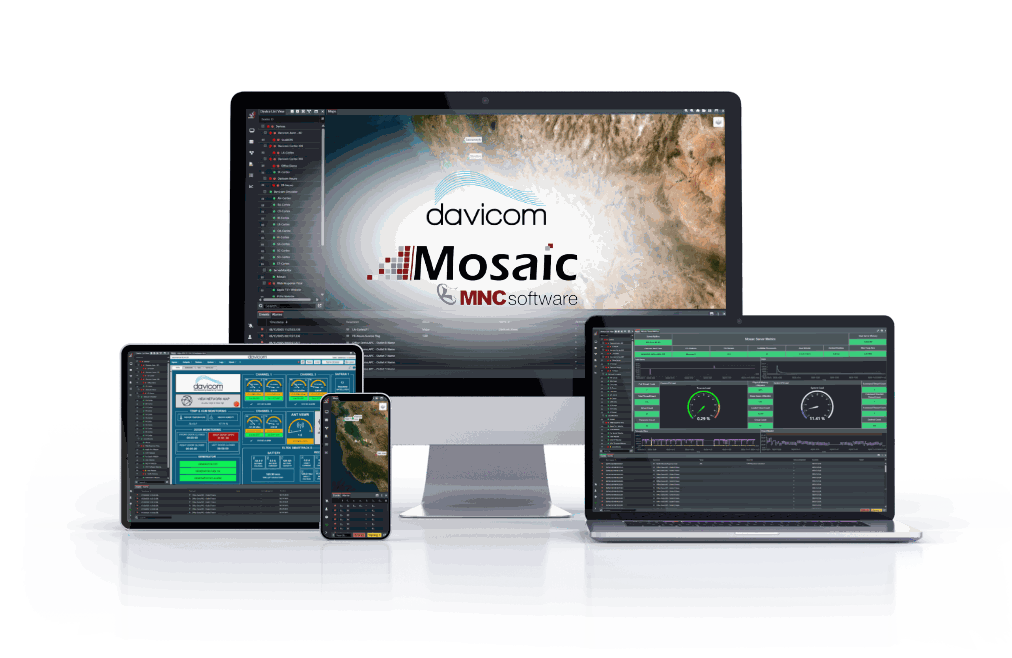
Mosaic running on desktop, laptop, tablet and phone

Desktop • Laptop • Tablet • Phone

01 The case for remote monitoring

Why Monitoring Matters

Remote sites include a variety of critical equipment such as generators, UPS systems, HVAC units, batteries, repeaters or transmitters. All these components must work together to maintain reliable communications. But when sites are spread across large regions and located in remote, hard-to-access areas, every service call becomes a serious expense in time, fuel and technician availability.

This is why adopting a remote monitoring approach with Mosaic is not only smart, it is essential. With Mosaic, every site visit becomes an opportunity to save money. You know exactly where the problem is before anyone leaves the office. You bring the right part with you. You avoid wasted trips and fix issues faster.

In today's labor environment, this matters more than ever. Technical teams are stretched thin and must support more sites with fewer resources. Their time is valuable. Davicom's remote site management tools protect that time by turning reactive work into smart proactive service. The result is better uptime, fewer surprises and a more efficient operation.

Watch Live Demo

This webinar presents Davicom's distributed intelligence approach using Davicom Cortex RTUs and Mosaic NMS for public safety repeater networks.
Watch Here
02 Network management

The Role of the NMS in an RTU-Based Monitoring Network

Mosaic by MNC Software is a pre-integrated Network Management System (NMS) designed specifically for Davicom RTUs: AXON, NEURO and Davicom CORTEX. It brings all site data into one interface, allowing operators to monitor network conditions and access detailed site information quickly. Alarms and logic are defined at the RTU level, making deployment simple and consistent. While Mosaic provides a centralized view with maps, alarm summaries and real-time site data, each RTU continues to operate independently, even without IP connectivity. This ensures that automation and alarm responses remain local, reducing bandwidth use and avoiding data loss.

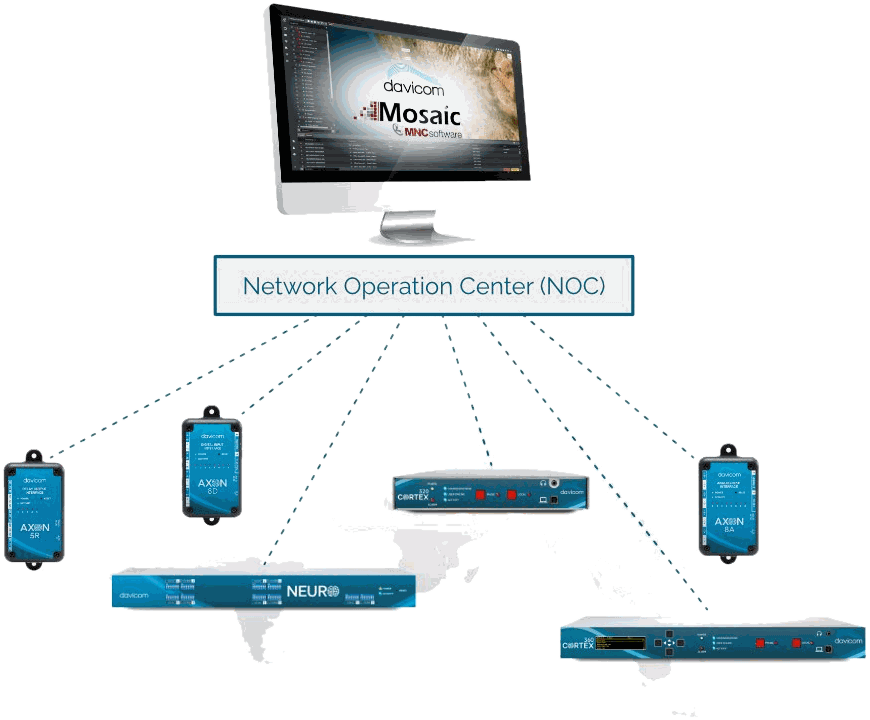
A Network Operation Center linked to Davicom RTUs across sites
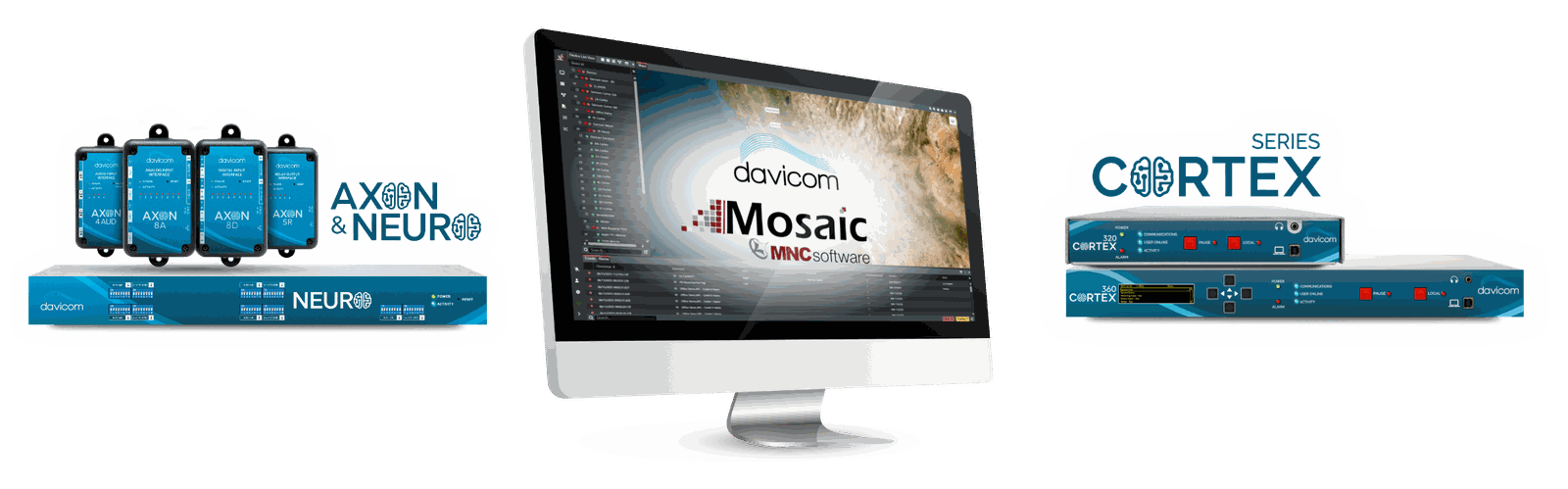
Mosaic on a workstation between AXON, NEURO and Davicom CORTEX units
03 Mosaic Key Features

Mosaic Network Management Software

Advanced Alarm Management

View, acknowledge, filter, and sort alarms in real time, making it easy to prioritize responses. You can configure alarm thresholds, set custom rules, and define escalation procedures to ensure the right people are notified at the right time. Audio signals also allow you to be made aware of unacknowledged alarms when you are not looking at the screen. With its intuitive dashboard, and annotation and logging capabilities, Mosaic gives you full control over alarm handling, helping streamline site management and improve overall situational awareness.

Multi-User Support

Allow multiple users to connect to the software at the same time with defined user access levels. The simple graphical interface and map view also allows even non-technical operators to understand the display. They can then correct simple problems themselves or contact technically qualified personnel accordingly.

Flexible Installation

Mosaic can be installed onto any server that supports Windows or Linux. Therefore, you can install the software on an internal server from your organization, or on a cloud-based server.

Backup Server

Ensure your peace of mind by installing and running Mosaic on more than one server at a time. Easily switch to the backup server in case of a primary server failure, allowing all of Mosaic's monitoring features to keep operating with no interruption.

Interactive Map View

Quickly visualize all your sites and their status

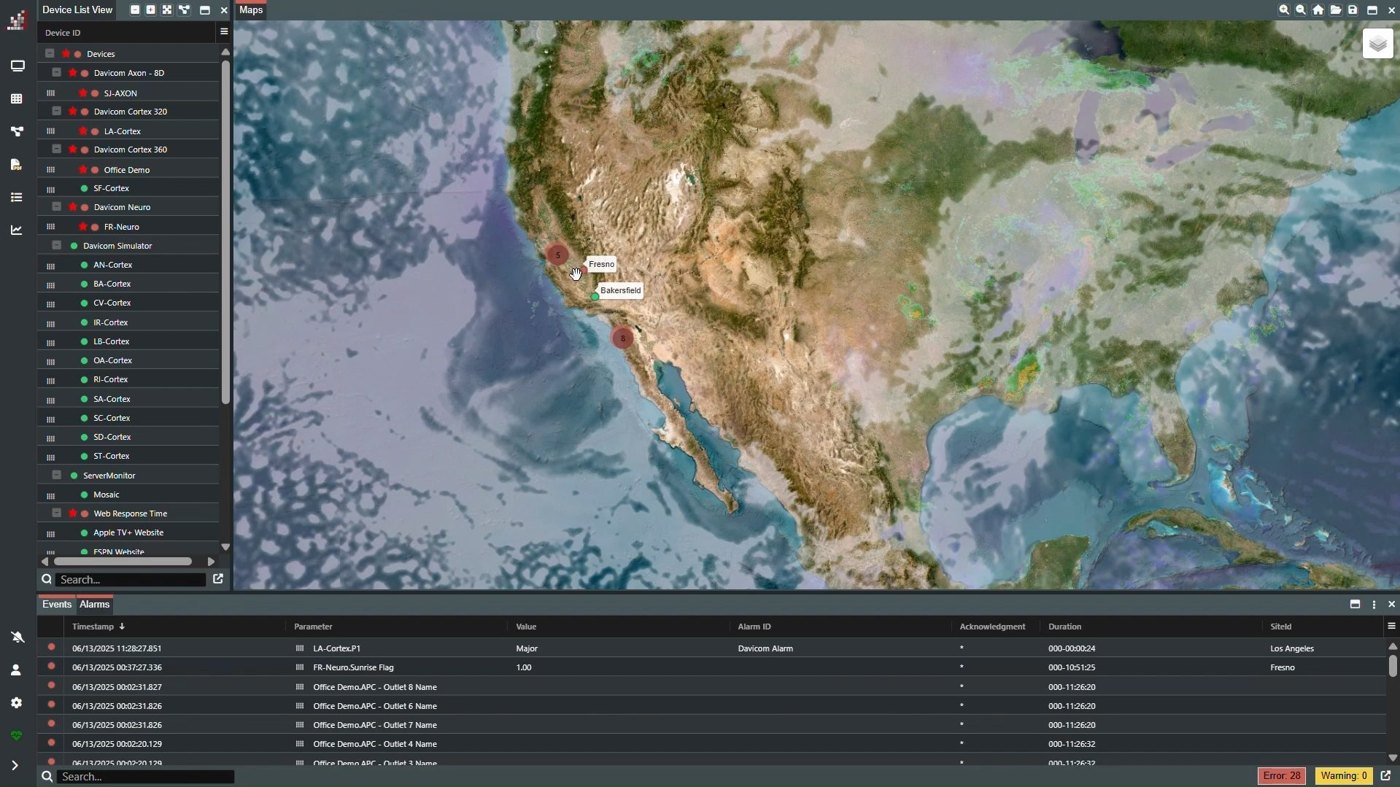
Quickly visualize all your sites and their status with intuitive alarm color-coding and symbols. Add layers such as precipitation, cloud coverage, wind speed, and more to gain a global view of weather conditions. Access any Davicom site RTU instantly by clicking its location on the map and opening a direct connection to the unit's web GUI from within Mosaic for detailed monitoring and control.

The Mosaic map with the device list and the alarm table
Reports

Generate detailed reports on demand or on a schedule

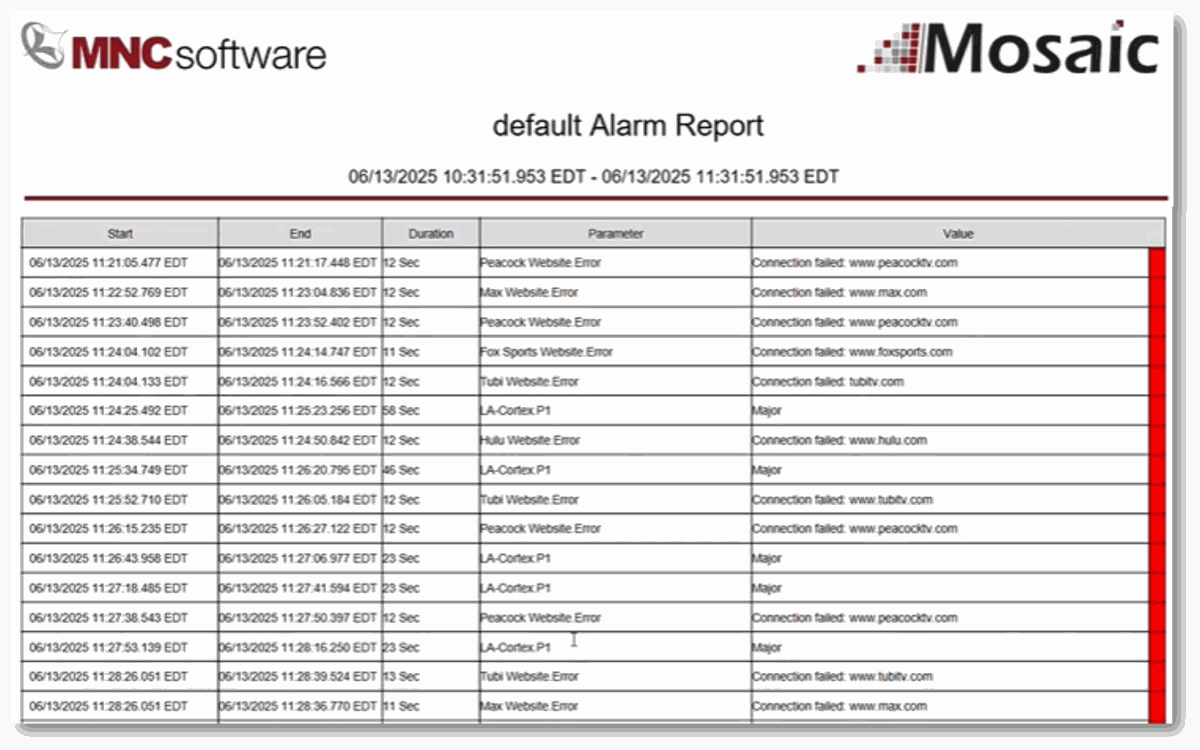
Generate detailed reports from default or pre-defined templates in a variety of formats (PDF, HTML, DOCX, XLSX, CSV) for easy sharing and documentation. These give you a comprehensive list of every alarm that occured in the specified time-frame, as well as the duration of the alarm. Reports can be scheduled or generated on demand to best fit your needs.

A default alarm report generated by Mosaic
Data Analysis

Aggregate, correlate, and interpret information across your network

Aggregate, correlate, and interpret information collected from multiple Davicom monitoring units across your network. Mosaic acts as a centralized dashboard where you can view real-time statuses, generate historical trend graphs, and create customized alarms or reports based on specific parameters. By consolidating data from AXON, NEURO, and Davicom CORTEX series units, Mosaic enables deeper insights into network performance, helping you identify patterns, detect anomalies, and make informed decisions to improve reliability and operational efficiency.

Historical trend graphs in Mosaic
Customizable Dashboards

Group specific readings from multiple sites into one screen

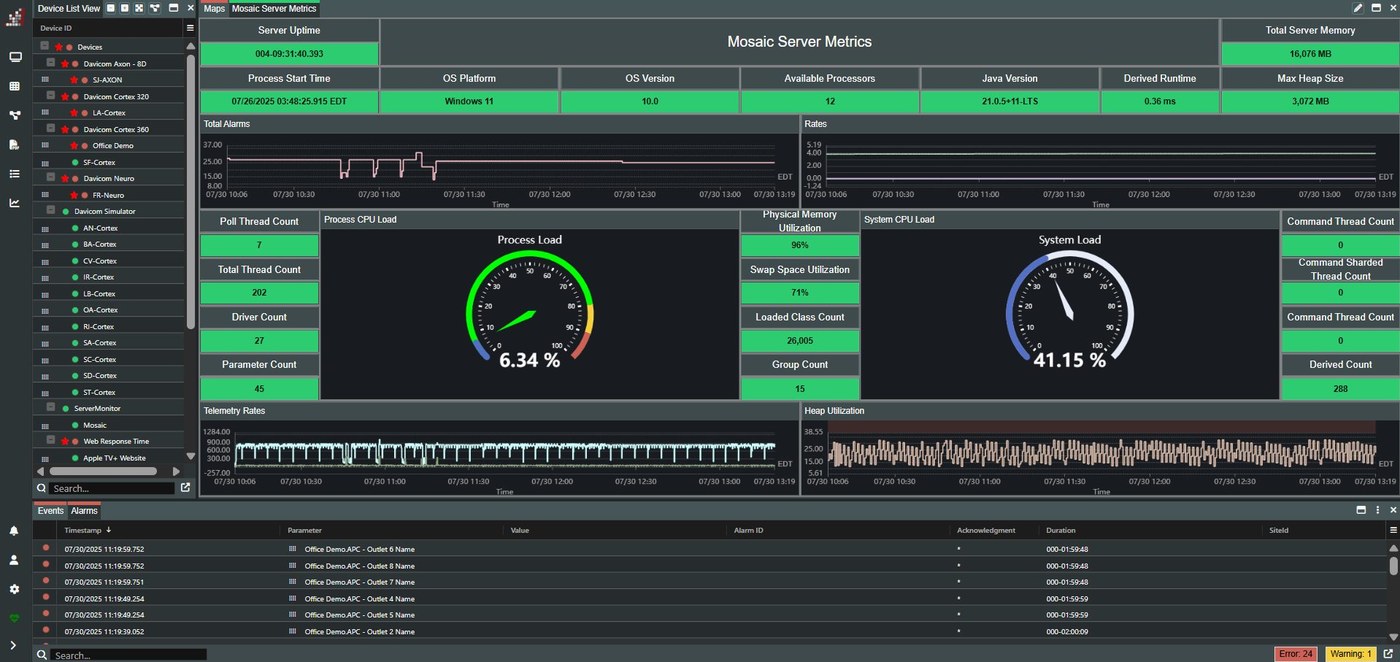
Group specific readings from multiple sites into one screen to get a network-level overview of your equipment status. For example, create a dashboard to display the status of the generators or VSWR antennas at all your sites.

A Mosaic dashboard with server metrics and gauges

Download the Brochure

PDF Version of the Complete Davicom Solution Including Mosaic.
Download Here
04 The units behind the dashboard

Discover Our RTUs

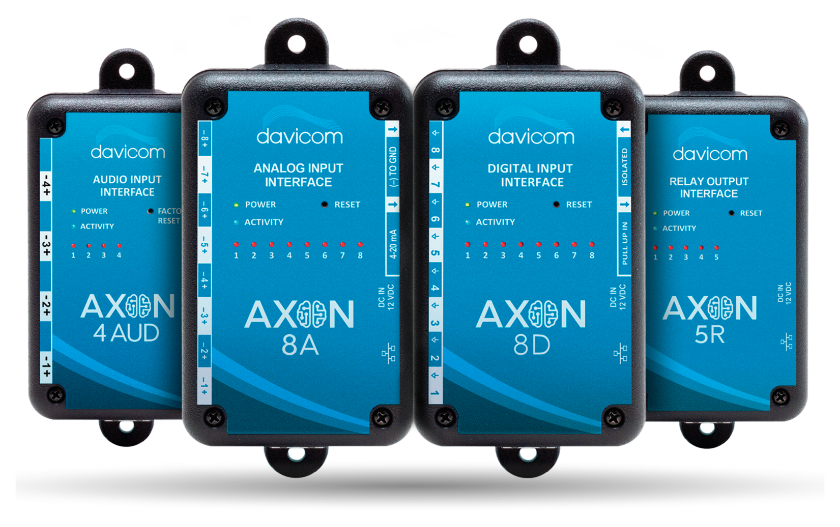
Davicom AXON modules

AXON Series

Smart Standalone I/O Modules with Alarms and Web GUI

Learn More
Davicom NEURO

NEURO Series

Flexible RTU with Customizable Input and Output Configuration

Learn More
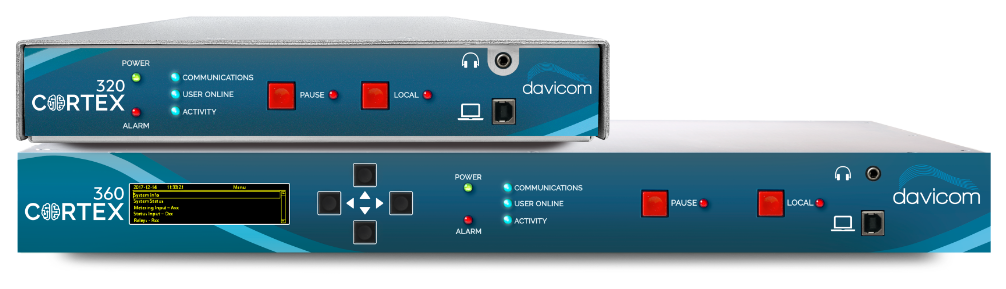
Davicom CORTEX-320 and Davicom CORTEX-360

Davicom CORTEX Series

Advanced RTU with GPIO Interface, SNMP Manager, and Modbus Client

Learn More
05 One RTU per site

Why Do You Need an RTU at Each Site?

An RTU connects everything at your site, and sends reports and information to the NMS.

Everything an RTU connects at a site: repeaters, generator, DC power, microwave radio, tower light, environmental sensors

Repeater System: Tait, Motorola, Kenwood, Icom and EF Johnson

Monitoring repeaters, such as those from TAIT, MOTOROLA, KENWOOD, ICOM, and EF JOHNSON, is essential to ensure uninterrupted mission-critical communications. Davicom RTUs can interface directly with these systems via SNMP (when supported) or through RF Power Sensors and PTT qualifiers. This allows for precise tracking of forward and reflected power, enabling early detection of antenna issues, signal degradation, or equipment failures, before service is disrupted.

AC Power: utility power, generator runtime, fuel levels and transfer switch

Power outages are a top cause of remote site troubles. Davicom RTUs monitor utility power status and independently verify that switchover to backup sources (like UPS or generators) has occurred. This dual-check approach ensures no blind spots during outages. Moreover, Davicom monitors generator runtime, fuel levels, start signals, and transfer switch status. Through local inputs, SNMP, or Modbus (if the generator controller supports it), our RTUs confirm proper operation and flag issues immediately, so you're never left in the dark.

Tower Lighting System

Aviation safety rules often require constant awareness of tower light status. Davicom monitors light status, photoresistor sensors, and current flow to detect bulb failures, day/night transition issues, or system faults. When a fault is detected, alarms are sent instantly, helping you maintain compliance and reduce liability.

Microwave Links

Microwave backhaul is the backbone of many communication networks. Davicom RTUs can monitor microwave radios using SNMP or GPIO, depending on equipment capability. Signal strength, Bit Error Rate (BER) link status, and radio health are tracked in real time, enabling preemptive maintenance and fast response to outages.

DC Distribution Panels

Davicom RTUs can connect to DC panels through analog metering, status inputs, or directly via SNMP if supported. This enables monitoring of individual breaker states, current levels, and bus voltages. Early detection of anomalies like tripped breakers or voltage drops helps avoid service interruptions and simplifies power diagnostics.

Uninterruptible Power Supplies (UPS)

With SNMP support, Davicom RTUs integrate effortlessly with network-enabled UPS systems. You can monitor battery charge, voltage, load percentage, runtime, and fault states, without adding extra hardware. Whether using SNMP polling or traps, Davicom provides a full picture of UPS readiness, ensuring critical systems are always protected.

Environmental Sensors: temperature, humidity, smoke, water intrusion

Davicom integrates with a wide range of environmental sensors including temperature, humidity, smoke, water intrusion, lightning detection, and more. By collecting and correlating these readings, Davicom RTUs enable true situational awareness and trigger alarms or automated actions to protect equipment and maintain optimal conditions.

RTU Comparison Chart

Compare our RTUs to find the one that best fits your needs.

07 What it runs on

System requirements

Mosaic separates into three server roles. They can run on three machines or share one, depending on the size of the network. Sizing follows how many devices you monitor and how much history you keep.

Production

Polls the network, processes alarms and events, runs the automation and correlation engines.

Archive

Holds the historical database behind trends, reports and alarm history. The storage heavy role.

Web

Serves the browser clients. It needs a graphical environment, so it cannot run on a headless install.

Server hardware, minimum and recommended

RoleCPUMemoryDiskNetwork
Production minimum Intel Xeon E-24348 GB80 GB100BASE-T
Production recommended Intel Xeon Silver 431032 GB500 GB1000BASE-T
Archive minimum Intel Pentium G74008 GB1 TB100BASE-T
Archive recommended Intel Xeon E-248616 GB4 TB1000BASE-T
Web minimum Intel Xeon E-24348 GB80 GB100BASE-T
Web recommended Intel Xeon Silver 431032 GB500 GB1000BASE-T
All three on one machine minimum Intel Xeon E-243416 GB1 TB1000BASE-T
All three on one machine recommended Intel Xeon Silver 431032 GB4 TB1000BASE-T
Desktop client minimum Intel Core i54 GB20 GB100BASE-T
Desktop client recommended Intel Core i716 GB100 GB1000BASE-T

Virtualised deployments are supported and sized the same way, counted in vCPU: 2 to 16 for production, 2 to 8 for archive, 4 to 16 for web.

Software

Server OS
Linux (RHEL 8+, Rocky 8+, Ubuntu Server LTS 22+), Windows Server 2019 or later, or Windows 11 Pro
Desktop client OS
Linux, Windows or macOS. Windows preferred.
Browsers
Edge, Chrome or Firefox 125 or later, Safari 7.1 or later
Archive database
Oracle 10g or later, Microsoft SQL Server 2014 or later, MySQL 5.6 or later, MariaDB 10.1 or later

Storage, links and redundancy

  • Storage. RAID 1, 5 or 10 is strongly recommended on any server holding the archive: fault tolerance on the array, and faster history and report queries.
  • Site links. Mosaic is built for low bandwidth. A site transfers about 25 KB on first connection, then about 1 KB every two seconds. Sites do not need a fixed IP address.
  • Redundancy. Two or more servers cooperate as a primary and one or more backups. Configuration and checkpoint data synchronize automatically, so a backup is ready to take over. Failover can be automatic or operator initiated, and the backups can sit in a different location.
08 Contact

Need help, or ready to purchase?

Get in Touch

Ready for the next step? Schedule a call or demo with a member of our sales team or quickly and easily request a quote.

Get started

Support Portal

Find solutions and useful resources like articles, downloadable datasheets, manuals, software, workspaces and more.

See more

Find a Dealer

Find a Davicom authorized dealer. Our dealer locator provides the most up-to-date information on dealers close to you.

Find a dealer
Video